
Introduction
The most dangerous SharePoint incident may look completely ordinary. When an organization discovers that sensitive content in SharePoint Online has been available to somebody who should not have had access, the immediate reaction is often to identify the mistake.
Who shared the file?
Who changed the permissions?
Who configured the site?
Those are useful investigative questions, but they aren’t necessarily good architectural questions. Microsoft 365 is designed for collaboration. SharePoint and OneDrive allow users to share content with external partners, vendors, customers and other people outside the organization. Microsoft recommends treating external sharing as part of your overall SharePoint and OneDrive permissions planning rather than regarding it as an isolated capability.
This creates an important distinction. Sharing is not inherently a security incident. External collaboration may be exactly what the business intended. The problem occurs when access, content, action and context stop matching.
Pattern:
Design SharePoint security around combinations of data, identity and activity, not around the assumption that one permission setting can describe every business risk.
We did discuss various aspect of building piratical Zero Trust architecture few months back, in this article, within our Security section.
Data exposure is often a sequence of legitimate decisions
Initially, only employees use it. Six months later a supplier joins the project and legitimate external collaboration begins. The users share several project documents with that supplier. Later, somebody updates one of those documents with sensitive customer information. Nothing necessarily changed in the site’s original sharing configuration. Nobody necessarily performed a deliberately risky administrative action.
What changed was the business context of the content.
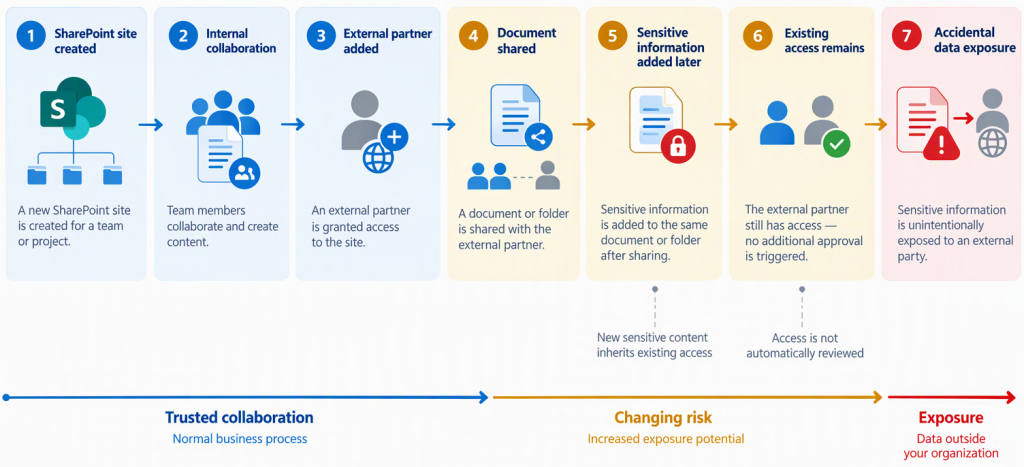
This is exactly why data protection cannot be reduced to access control alone. Microsoft’s Zero Trust architecture includes information classification, encryption and DLP as data protections while also emphasizing least privilege and an assume-breach philosophy.
Four dimensions of SharePoint data exposure risk
A useful operational model is:
Access
Who can reach the information?
This includes site membership, SharePoint groups, Microsoft 365 groups, external guests and sharing links.
Content
What does the object contain?
A project timetable and a customer database may live inside the same library but present dramatically different risks.
Action
What is the user doing?
Viewing, editing and externally sharing an item have different consequences.
Context
Under what conditions is the action occurring?
External sharing, sensitive information, guest access, organizational boundaries and other factors can change the risk.
The security decision therefore looks more like: ACCESS + CONTENT + ACTION + CONTEXT = RISK
rather than: PERMISSION = SECURITY
Anti-pattern:
Everyone accessing this library is authorized, so the information is protected.
Authorization to access a location does not automatically make every subsequent action appropriate.
Why Zero Trust matters here
Zero Trust is useful for SharePoint precisely because it does not start from the assumption that trusted users always make correct decisions.
Microsoft defines three fundamental Zero Trust principles: verify explicitly, use least privilege access and assume breach. Microsoft’s data pillar adds classification, encryption and DLP, while visibility and analytics support detection and response.
Applying that thinking to SharePoint means accepting two uncomfortable facts:
- Users will eventually make mistakes.
- Administrators will eventually overlook something.
The architecture should therefore make those mistakes less consequential.
Pattern:
Build for recoverability, visibility and constrained impact instead of trying to create an environment where mistakes are theoretically impossible.
Conclusion
The question after an accidental SharePoint exposure should not stop at: “Was this user error or admin oversight?”
The more valuable questions are:
- Could we see what happened?
- Could we recognize the sensitivity of the information?
- Could we intervene when the action became risky?
- Could we do all of that without preventing legitimate collaboration?
Those questions lead naturally into SharePoint sharing governance, Microsoft Purview Audit and DLP.


Be the first to comment