
Introduction
This article is for Security Copilot agents available in Microsoft Purview, such as triage agents for Data Loss Prevention (DLP) and Insider risk management, posture agents in Data Security Posture Management (DSPM)/Investigations), how they work at a high level, what they require operationally, and the patterns that determine whether they succeed in production.
Embedded experiences for admins and analysts
Security Copilot in Purview includes embedded capabilities that help security and compliance professionals identify, summarize, triage, and remediate issues across Microsoft Purview solutions (including DSPM, DLP, and Insider risk management).
Pattern:
Use embedded Copilot features to speed up orientation (what happened, what policy fired), then switch to evidence views (activity timeline, content preview) before action.
Relying on summaries without validating underlying evidence is fragile. Treat Security Copilot as means to get faster results, not authority.
What “Security Copilot agents in Microsoft Purview” are?
Microsoft describes Security Copilot agents as AI-powered processes that perform specific role-based tasks. In Microsoft Purview, that breaks into two practical categories:
- Triage agents: prioritize and explain alerts;
- Posture agents: help find sensitive exposures (including credential leakage), across Microsoft 365 data using natural language and automated scanning.
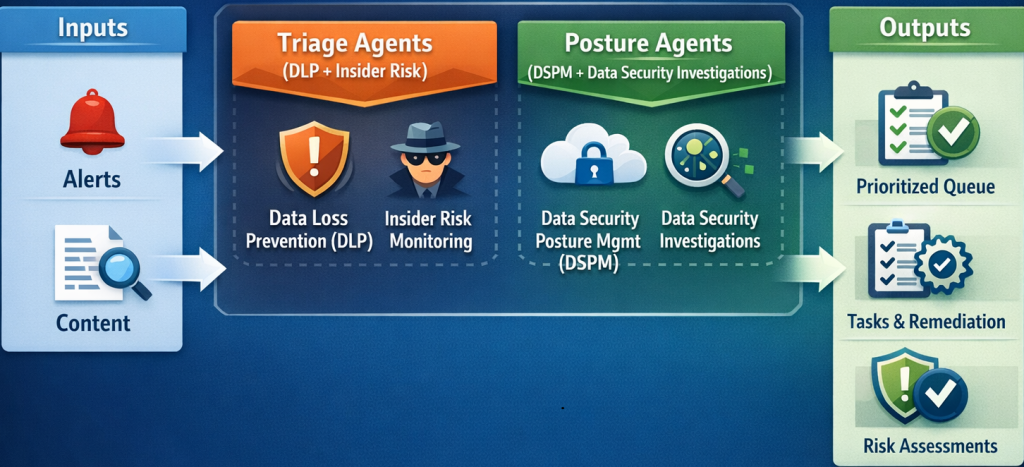
These agents are designed to be used within Purview experiences, as well as for DLP triage. This implies, that they are available across Microsoft Purview and Microsoft Defender XDR portals. So this is not just “another new tool”, but a new workflow layer that reduces manual operations and accelerates investigation readiness.
Pattern:
Adopt agents as workflow primitives, such as managed queues and task boards, and not as “AI summaries” You read once and ignore.
If you turn on an agent without a clear hand-off path (who acts on top-priority items), you’ve automated noise, not response.
Triage agents
Microsoft Purview overview states the triage agent provides a managed alert queue that identifies and prioritizes the highest-risk activities, analyzes content and potential intent, and provides an explanation for how it categorized items.
The service offers triage agents for Data Loss Prevention (DLP) and Insider risk management.
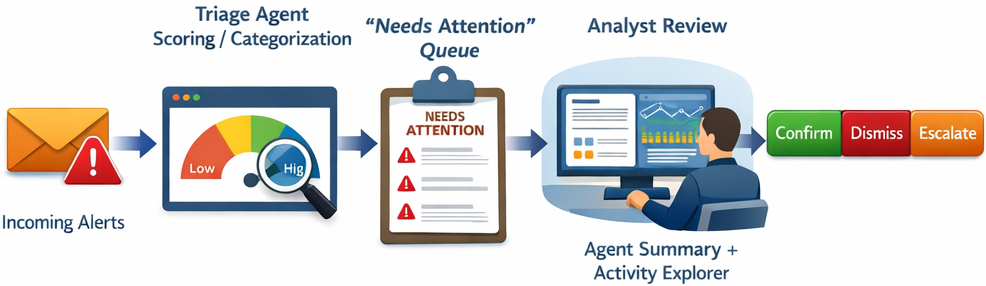
If we look it from the DLP side, it can be deployed both from Microsoft Purview and Microsoft Defender XDR portals. The alerts are aggregated from policies within to Exchange, Teams, OneDrive, SharePoint, and devices (Endpoint). One very practical operational detail: remediation reminders via Teams exist, and there’s separate guidance that the data security triage agent can send remediation messages through Teams. In order for this to work, Microsoft Teams settings must be configured (including enabling org-wide Microsoft apps and ensuring the agent app is available).
Pattern:
Treat “Device evidence collection” and “Teams remediation channel” as dependencies. Always plan and validate them before claiming full triage coverage.
Turning on triage without endpoint evidence collection creates blind spots. Unfortunately, device alerts won’t behave like mailbox/file alerts.
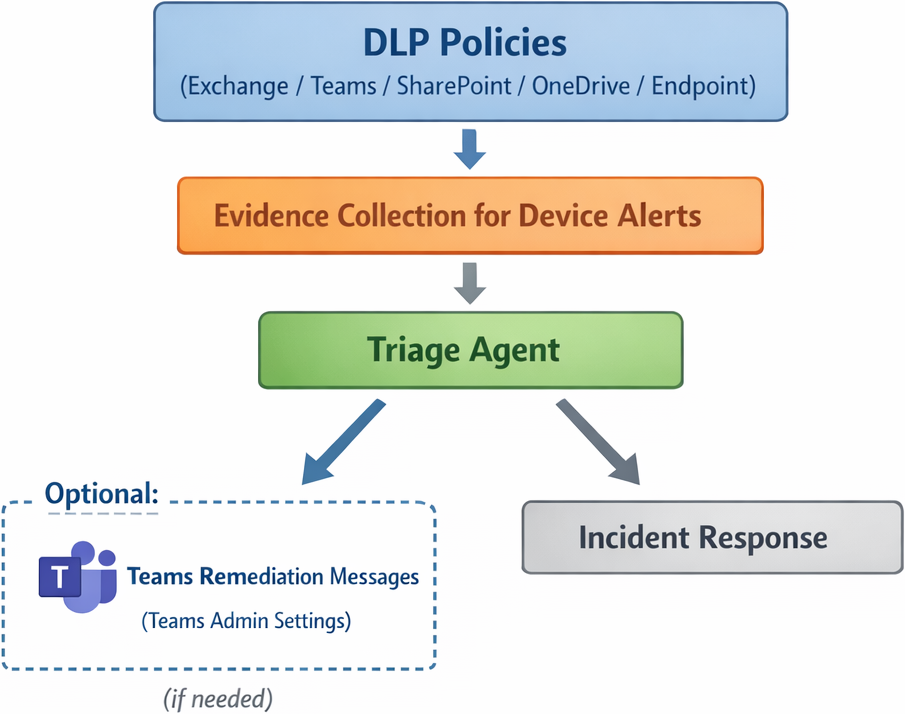
In Insider Risk Management specifically, investigations can use either the standard alert dashboards or the Alert Triage Agent dashboard, with workflow guidance reviewing the agent summary, and then validating through Activity explorer and related views. Now, be aware that it is requiring both the standard per-seat licensing model and pay-as-you-go billing, and that triage agents consume Security Compute Units (SCUs).
Pattern:
Use triage to prioritize, then use investigation artifacts (timeline, connections, content preview) to reduce false positives before escalation.
Don’t let highest priority issues, become automatic escalation. The insider risk guidance stresses the need for real investigation beyond system insights.
Posture agents
Microsoft Purview overview describes the posture agent as helping discover sensitive data across the data estate using natural language. It has LLM-based understanding of user intent, searching across Microsoft 365 content (documents, emails, messages, and Copilot interactions) and returning a summary plus risk analysis.
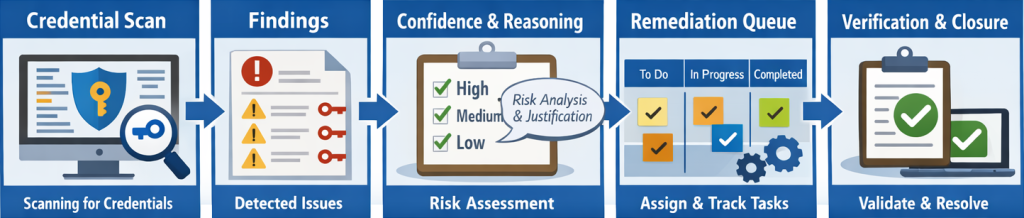
In Data Security Investigations, the posture agent extends this into proactive credential discovery at scale, automating credential scanning across Microsoft 365 locations (SharePoint, OneDrive, Exchange, Teams). It produces AI-generated risk assessments with confidence and reasoning, and tracking work on a Kanban-style task board.
Pattern:
Use posture scans as a repeatable hygiene control: run scoped scans, prioritize high-confidence findings, and convert remediation into tracked tasks.
Don’t treat credential findings as automatically true. Always validate with context, because AI outputs can be wrong or incomplete.
Identity, permissions, and agent lifecycle
Let’s discuss how we can avoid some hidden operational failures. The preview guidance for agents in Purview highlights several operational details that teams should plan for early. These are easy to overlook, but they can lead to silent failures if ownership and monitoring are not clearly assigned.
- In some deployment models, agents run under the identity of the administrator who enabled them;
- Agent authentication expires after 90 days and must be renewed.
This is exactly the kind of operational nuance that causes silent failures if teams don’t assign ownership and monitoring. Treat the agent as a production service identity, with clear ownership, renewal reminders, and change control.
If an agent remains tied to a single Administrator account without a renewal process, triage coverage can degrade silently when authentication expires.
The following implementation practices help teams adopt Purview Security Copilot agents more effectively and avoid common rollout issues:
- Start with a single workload. Enable triage for DLP alerts first, validate the quality of the needs attention queue, and then expand to Insider Risk.
- For posture scenarios, begin with a limited scope (specific locations or business units), before moving to tenant-wide credential scanning. This makes the process easier to validate and turn into a repeatable cadence.
Conclusion
Security Copilot agents in Purview deliver the most value when they are treated as operational workflow engines rather than one-time AI helpers. Triage agents help reduce alert fatigue by prioritizing and explaining risk. Posture agents help uncover sensitive exposure (including credentials) at scale across Microsoft 365 services data.
Successful implementation depends on both prerequisites and lifecycle discipline. This includes validating coverage dependencies such as device evidence collection and Microsoft Teams remediation settings, as well as establishing clear ownership, authentication renewal, and ongoing operational oversight.
Use the agents to accelerate prioritization and discovery, but keep decisions grounded in evidence by validating findings through established investigation views and workflows.



Be the first to comment