Introduction
When we look at how Microsoft 365 services have evolved, in the past few years, for Small and Medium size organizations (SMBs) this is more than ‘simple’ productivity suite. I mean, we are not talking about a traditional ‘network security perimeter’ anymore. The center piece of this model is the digital identity, that we as user and/or administrators, use within these services. And on this identity, a lot of the security decisions are enforced at sign in. This is at the core of the Modern Workplace concept.
I’m writing this articles , with couple of assumptions in mind, such as:
- We are talking about single tenant organizations
- Microsoft Entra ID is the sole identity provider
- For the users, core workloads are Exchange Online, Microsoft Teams, OneDrive and SharePoint Online.
In case there is more, yes, the same principles will apply, but the depth might be different. What I will try to cover is what should be in focus of the administrators of such environment (within an SMB customer segment).
Identity is the ‘new black’
For this customer segment, there are couple of ‘truths’ that are valid in majority of the scenarios:
- Limited administrative resources, one person wearing (too) many hats (external IT consultants support the tenants)
- It is all about simplicity and efficiency (costs)
- We all like security, but if we can ‘bend it’ would be better (at least make it manageable)
Where does this leave us with our Microsoft 365 tenant? Well, as stated many times in Microsoft documentation: ‘Identity is the primary control plane’. This is the role of Microsoft Entra ID. And yes, if we follow the Zero Trust guidance for Entra ID, methodology and architecture practices, we should be fine. Right?
The reality with every SMB customer, boils down to these:
- There is no dedicated security person/team (no SOC)
- There is always couple of users with ‘access all areas’ admin rights (and, even worse, some are IT generalists)
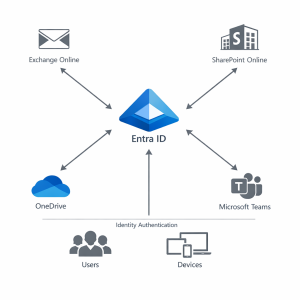
The reality for the users, in this case, is that identity misconfiguration leads to high-impact risks. If we look it from services perspective, the default is that Exchange Online, SharePoint Online and Teams do not trust the network location. This means that every access request gets evaluated trough Microsoft Entra ID, before workload access is granted. So, weak identity controls will affect all of these services, at the same time. Cloud services don’t have the option for ‘contained’ breach.
Zero Trust for SMBs tenants
If You have seen the Zero Trust implementation guidance, you might get the feeling that this is too ‘enterprise’ for me (my org, my costumer org). Good news is that it is the default operating model of Microsoft 365, and that is no related to the size of the tenant.
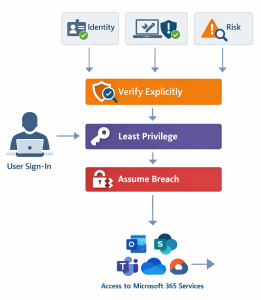
The above diagram shows the authentication flow, during of process of user verification, matching appropriate role, and allowing/blocking user to access Microsoft 365 services. This is what provides the consistency across services, applied trough automated process and visible trough all the logs and audit data available in the tenant. In case of a ‘greenfield’ environment (starting from scratch, it is a rather straightforward process.
Additional information:
Microsoft Entra ID Learning Collection
Deploy your identity infrastructure for Microsoft 365
Zero Trust Assessment
During a migration process, we usually put emphasis on speed and continuity, rather than on long-term security. Some of the typical ‘shortcuts’ include:
- ‘To avoid user disruption’ MFA is (temporarily) disabled
- Legacy authentication is kept for older apps (rare, but exists)
- Someone gets assigned as ‘Global Admin’ to resolve some issues (and they are never revoked)
What happens in reality, these settings remain as-is indefinitely, creating silent exposure. All of these mentioned above, affect Microsoft Entra ID authentication policies, SharePoint Online and OneDrive permission inheritance and (last, but not least) Exchange Online protocol access.
Hardening Microsoft 365 SMB tenants
Lucky for you, there is prescriptive guidance, from Microsoft, how to harden the security configuration, what to look for during initial setup. This is also valid for migrated tenants as well. This helps minimize the ‘blast radius’ if something happens. The following table outlines the items you need to pay attention to:
| Area | What to check |
|---|---|
| Identity | Global Admin accounts (max. 2); Work related Admin roles; Role separation (daily vs. admin tasks) |
| Services | Microsoft 365 service/tenant settings: inherited permissions, oversharing, governance |
| Visibility/Traceability | Forensic records: Entra ID sign-in logs, Exchange logs mailbox actions, SharePoint logs file access |
Conclusion
This is just a glimpse of what Microsoft 365 tenant Administrators need to look for, when managing their or their customer environments. Either way, any form of successful administration relies on strong identity controls, establishing Zero Trust baseline and understanding the Microsoft 365 service behavior at platform level.
What we all have on our side, is the Microsoft 365 architecture that already provides a lot, and with supporting documentation and trainings (shared within the article) we can reach the desired security baseline for the tenant. Just remember that the biggest risk lies in the default settings and legacy decisions that tend to ‘stick’.
References
Microsoft service adoption framework (training)
Microsoft 365 Administrator (Learning collection)
Microsoft 365 Administration
Microsoft 365 Migration Guidance


Be the first to comment