
As organizations accelerate their cloud adoption, security must be treated as an enabler of innovation, not an afterthought. The Microsoft Cloud Adoption Framework for Azure (CAF) and the Azure Well‑Architected Framework (WAF) provide practical, repeatable guidance to design, implement, and operate secure cloud platforms.
This article summarizes key security considerations from these frameworks and maps them to relevant Azure and Microsoft security services you can use today.
Additional information:
Microsoft Zero Trust Model
Zero Trust Guidance Center
Establish a strong security governance model
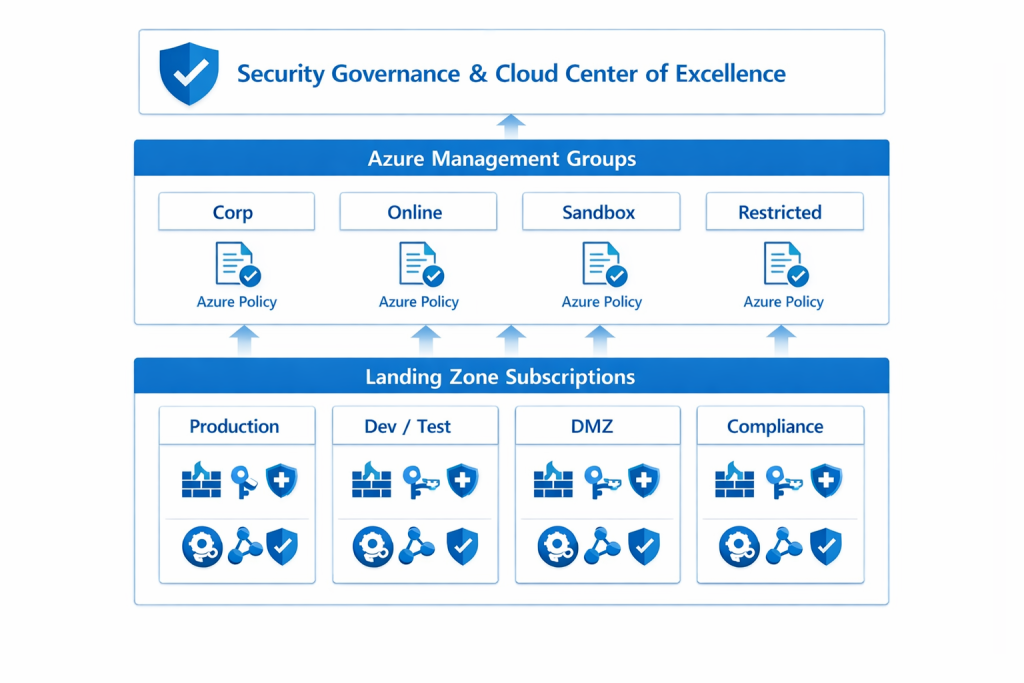
Security governance defines who makes which decisions, based on what policies, and how those policies are enforced. In CAF, this sits primarily in the “Govern” and “Ready” stages and is operationalized through landing zones and policy-driven guardrails.
Patterns and practices
- Define clear ownership for security, identity, and data: Security Owner / CISO function, Platform Owner / Cloud Center of Excellence (CCoE)
- Use management groups to structure your tenant by scope (e.g., Corp, Online, Sandbox, Restricted) and apply different policies per segment.
- Implement policy-as-code to avoid configuration drift and shadow IT.
Relevant Microsoft services
- Azure Policy: define and enforce guardrails (e.g., allowed regions, mandatory encryption, tag requirements).
- Management Groups: organize subscriptions for policy and RBAC at scale.
- Microsoft Entra ID: central identity and access control, including security groups, roles, and conditional access.
- Microsoft Purview: data governance, classification, and catalog to align information protection with governance decisions.
- Azure Landing Zone Accelerator (CAF-aligned): reference architectures and templates that embed governance and security from day one.
Implement Zero Trust as the default security posture
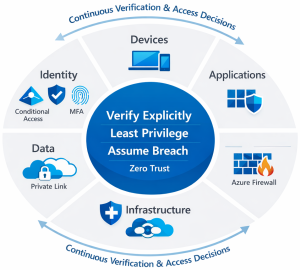
Both CAF and the Well‑Architected Framework emphasize Zero Trust: never trust, always verify, least‑privilege everywhere. This is especially relevant for hybrid and remote work scenarios where the traditional network perimeter no longer exists.
Patterns and practices
- Identity as the primary control plane:
- Enforce Multi-Factor Authentication and Conditional Access policies:
- Use Privileged Identity Management (PIM) for just‑in‑time privileged access.
- Segment and isolate workloads and environments
- Use hub-and-spoke or Virtual WAN with clear separation between shared services, management, and workloads.
- Secure devices and endpoints connecting to your workloads.
Relevant Microsoft services
- Microsoft Entra ID, Conditional Access, and Multi-Factor Authentication (MFA): implement strong authentication and risk-based access control.
- Microsoft Entra Privileged Identity Management (PIM): just‑in‑time elevation for admins and break-glass accounts.
- Azure Firewall, Network Security Groups (NSGs), Azure DDoS Protection, and Azure Bastion: secure, segmented, and controlled network access.
- Microsoft Intune: device compliance and configuration as part of Zero Trust access decisions.
- Microsoft Defender XDR suite (Defender for Endpoint, Identity, Office 365, Cloud Apps): end‑to‑end threat protection across identities, endpoints, email, and SaaS apps.
Secure the Landing Zone foundation
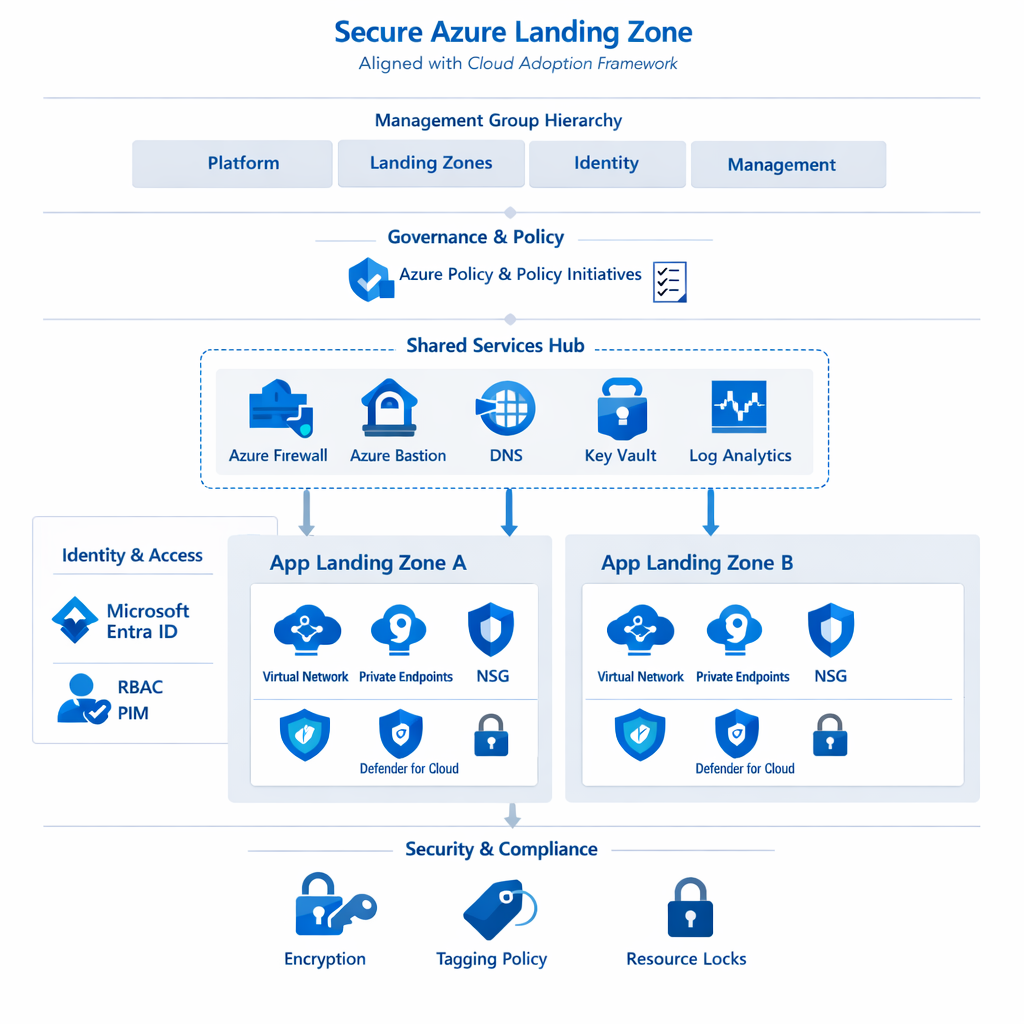
CAF’s landing zone concept ensures that security, governance, networking, identity, and operations are in place before on-boarding workloads. This reduces rework and inconsistent security baselines.
Patterns and practices
- Start with a CAF-aligned Azure Landing Zone rather than ad‑hoc subscriptions.
- Standardize identity and network topology:
- Single or multi-tenant strategy
- Hub-and-spoke or Virtual WAN
- Make encryption and secrets management non-negotiable defaults.
- Use blueprints/templates to deploy secure patterns repeatedly across projects.
Relevant Microsoft services
- Azure Landing Zone Accelerator: Bicep/Terraform reference implementations aligned with CAF Enterprise-scale architecture.
- Azure Virtual Network, Azure Virtual WAN, Azure Private Link, Private Endpoints: secure connectivity patterns.
- Azure Key Vault: centralized secrets, keys, and certificate management.
- Azure Storage encryption, Azure SQL Transparent Data Encryption (TDE), TLS for App Services and APIs: encryption at rest and in transit by default.
- Azure Policy and Template Specs / ARM / Bicep / Terraform: reusable, governed deployment patterns.
Build for resilience with the Well‑Architected Framework
Under the Security and Reliability pillars of the Well‑Architected Framework, security and resilience are treated as complementary: you design for secure-by-default and failure-ready systems.
Patterns and practices
- Defense-in-depth: layer controls across identity, perimeter, network, application, and data.
- Use managed services where possible to reduce patching and configuration overhead.
- Integrate security into DevOps processes (shift-left security, code scanning, policy checks in CI/CD).
Relevant Microsoft services
- Azure Application Gateway with Web Application Firewall (WAF) and Azure Front Door (with WAF): protect web apps from common exploits.
- Microsoft Defender for Cloud: Cloud Security Posture Management (CSPM) and workload protection (servers, containers, PaaS).
- Microsoft Defender for SQL, Defender for Storage, Defender for Key Vault: workload-specific threat detection and hardening.
- Azure Update Manager / Azure Automation: automate OS patching and configuration baselines.
- Azure Backup and Azure Site Recovery (ASR): backup, disaster recovery and business continuity.
- GitHub Advanced Security / Azure DevOps with security gates: integrate code scanning, dependency checks, and policy validation into pipelines.
Establish continuous monitoring and improvement
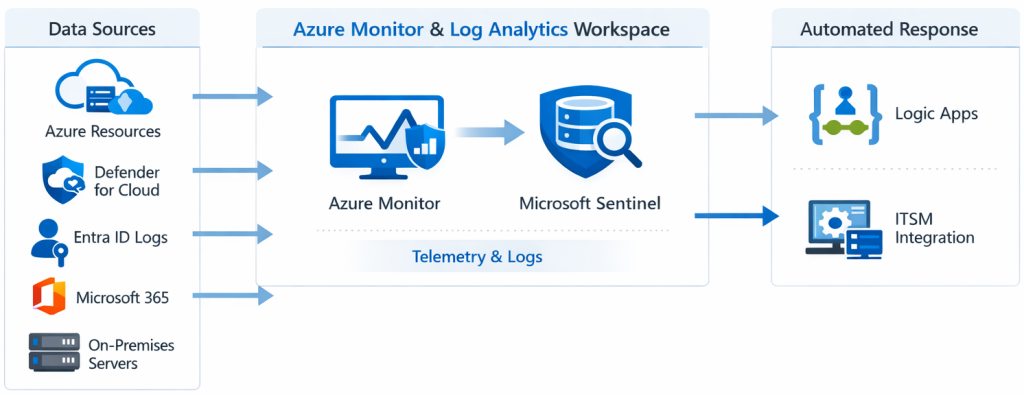
Both Frameworks highlight that security is a continuous practice, not a (one time) project. You need unified visibility, automated detection and response capabilities, and regular reviews of your security posture.
Patterns and practices
- Centralize logging and metrics from platform, workloads and security tools.
- Continuously assess your environment against benchmarks and regulatory standards (e.g., Azure Security Benchmark).
- Run regular drills (tabletop exercises, red teaming, incident simulations) and feed learning’s back into your policies and landing zones.
Relevant Microsoft services
- Azure Monitor & Log Analytics: collect and analyze metrics and logs across resources.
- Microsoft Sentinel: cloud-native SIEM/SOAR for correlation, detection, hunting, and automated response.
- Microsoft Defender for Cloud Secure Score: ongoing assessment of security posture with prioritized recommendations.
- Workbooks and Dashboards (Azure Monitor and Sentinel): visualizations for C‑level and operational reporting.
- Logic Apps: automate incident response playbooks and ticketing integration (e.g., ITSM tools).
Conclusion
Security in Azure is not a single project or tool. It is a capability built across governance, architecture, operations, and team culture. Align with the Cloud Adoption Framework and Azure Well‑Architected Framework, and by leveraging cloud native services such as Microsoft Entra, Defender for Cloud, Microsoft Sentinel, Azure Policy, and CAF-aligned landing zones. In this way, organizations can create a secure, resilient, and scalable foundation for digital transformation. It is all part of the process, that can have two different approaches: cloud migration or cloud transformation. This was covered as topic in a article, few years back (Link to article).
Leaders should treat these frameworks as living guides. First, start with a secure Azure Landing Zone and adopt Zero Trust. Second, enable and embrace continuous monitoring for the environment, then iterate using real‑world signals. The result is a cloud platform that supports innovation while consistently managing risk.
Additional resources
A Deep Dive into Azure Security Management | GitHub resources repository
Proactive Security | GitHub link resources repository
Azure Network Security Deep Dive | GitHub resources repository




Be the first to comment