Introduction
Microsoft 365 administration often starts with convenience: assign Global Administrator, solve the immediate access problem, and move on. That approach creates long-term operational risk because Global Administrators have broad access to organizational settings and much of the tenant’s data.
The challenge is not the existence of privileged roles. The challenge is long-lived administrative authority that can be exercised from any compromised identity, device, session, or workload integration.
For administrators, consultants, and architects, role design should be treated as an architecture decision, not a help-desk shortcut. A mature model separates identity administration, Exchange administration, SharePoint administration, Teams administration, billing, reporting, and migration responsibilities. The Microsoft 365 admin center exposes role assignments and detailed permissions so administrators can review what a role can do before assigning it.
Architecture and behavior
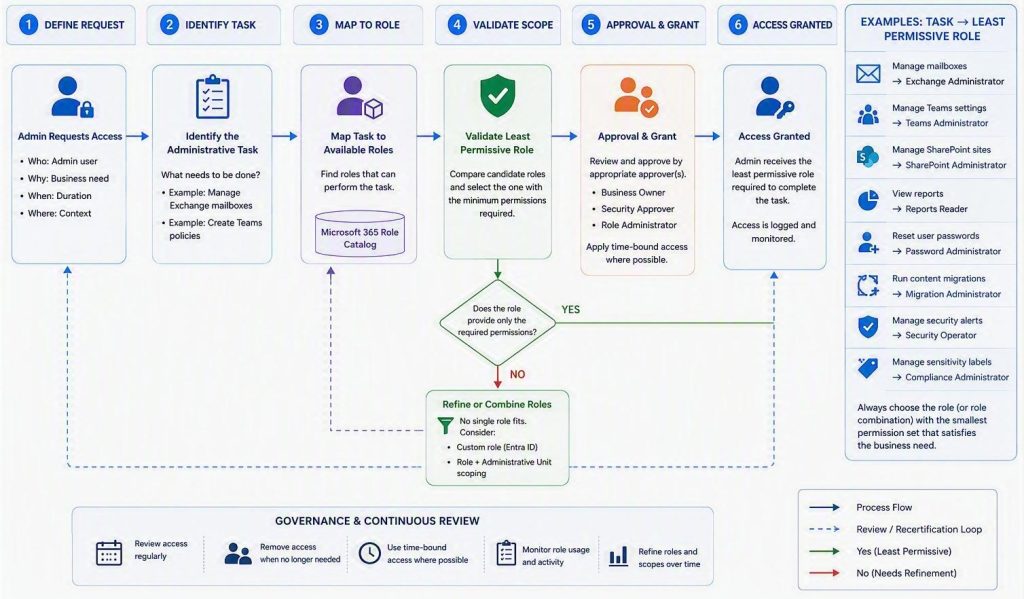
A secure Microsoft 365 role design starts by mapping administrative tasks to specific roles. For example, the Microsoft 365 admin documentation describes high-level admin roles such as Exchange Administrator, SharePoint Administrator or Teams Administrator. There are other roles, aimed at targeted admin operations. This would be task-specific role as Reports Reader for viewing usage and activity reports, and Helpdesk Administrator for reset and support tasks.
The Global Reader role is particularly useful in operational environments where stakeholders need visibility without configuration rights. The documentation describes Global Reader as a task-specific role for users who need to view administrator features and settings that a Global Administrator can view, without the ability to edit settings.
The Microsoft 365 Migration Administrator role is a strong example of task-specific privilege. The migration guidance states that the role provides access to Migration Manager in the Microsoft 365 admin center and avoids assigning broader SharePoint admin access when a migration-specific administrative role is enough.
This creates a pattern for audit, service review, and advisory work where visibility is needed but write access is not.
Administrative control planes
Treat Microsoft 365 administration as separate control planes rather than a collection of administrator accounts. For example, password reset activities should use a password or helpdesk-oriented role. Each standing role assignment should be tied to a clear operational responsibility. The security question therefore becomes: “How quickly can an attacker reach tenant-wide control after compromising a single account?”
A practical model consists of three planes:
- Identity control plane: Controls identities, role assignments, authentication methods, and privileged access. Compromise impacts would be tenant takeover, authorization bypass and security control manipulation
- Productivity control plane: Controls Exchange Online, Teams, SharePoint, OneDrive, and user-facing workloads. Compromise impacts are data exposure, business disruption and collaboration abuse.
- Security control plane: Controls security operations, compliance, investigations, and response workflows. Compromise impact would be alert suppression, business disruption and collaboration abuse.
The objective is preventing a single administrative identity from spanning all three planes simultaneously.
Role engineering before role assignment
Most organizations manage role membership without managing role design. Experienced environments reverse this process. Build a task-to-role matrix. Map each recurring administrative activity to the least permissive role that supports it. Microsoft’s Zero Trust guidance emphasizes least-privilege access and reducing exposure through controlled authorization boundaries rather than relying on trust assumptions.
Before assigning permissions:
- Model administrative operations;
- Identify required privilege boundaries;
- Map roles to functions;
- Define elevation requirements;
- Establish expiration criteria.
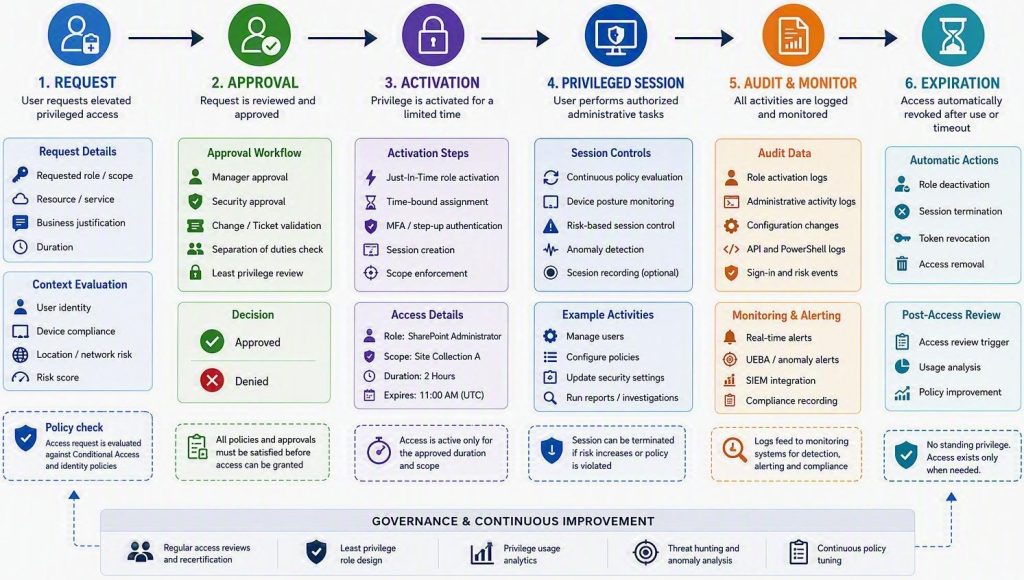
Only then should assignments occur. As a useful rule, every role assignment should have an expiration strategy, even if it is not technically enforced.
Validation and troubleshooting
Validate role assignments in the Microsoft 365 admin center by opening role assignments and reviewing the permissions and assigned administrators for each role. A useful architectural exercise is calculating administrative blast radius. You really, really need to know the answer to the question: “If this credential is compromised, what becomes controllable?”
Many environments discover that a single account can:
- Reset privileged passwords;
- Create privileged identities;
- Modify Conditional Access;
- Access collaboration data;
- Disable security controls.
This indicates privilege concentration. Segmentation should ensure that compromise of one administrative workload does not automatically lead to tenant-wide authority. Administrative identities should have no mailbox, Teams usage, web browsing activity, or productivity workload usage. The attack surface of an administrator account should be as close to zero as operationally possible.
Administrative actions should originate from dedicated managed devices. As a result, significant percentage of identity compromise investigations eventually trace back to endpoint compromise rather than identity platform weakness. Namespace separation between administrative workstations and productivity devices greatly reduces attack paths.
Treat privilege as ephemeral. The longer a privilege remains available, the more likely it becomes exposed. Privilege should be activated only for:
- Planned maintenance;
- Incident response;
- Change execution;
- Emergency recovery.
Troubleshooting administrative security
As far as potential troubleshooting scenarios, based on cause and potential fix, check the following table:
| Scenario | Root cause | Fix |
|---|---|---|
| Excessive Global Administrators keep reappearing | Role assignments are compensating for undocumented permissions requirements | Identify the specific operation that requires elevation and map it to the least privileged administrative role. The symptom is role sprawl and the cause is missing privilege design. |
| Security administrators request Global Administrator access | Responsibilities have crossed control planes | Determine whether the operation belongs to identity administration, workload administration, or security administration. Avoid solving architectural issues with broader permissions. |
| Audit reviews show role accumulation | Project-based assignments become permanent | Review role assignments against active responsibilities. Any role without a current operational justification should be challenged. |
| MFA adoption exists but risk remains high | Authentication strength improved while administrative exposure remained unchanged | Focus on: • Standing privilege; • Administrative workstation security; • Permission concentration; • Segregation of duties. |
These are just a few, but common scenarios. Strong authentication alone is not equivalent to privileged access security. This distinction aligns with Zero Trust principles of explicit verification and least-privilege access.
Conclusion
Least privilege in Microsoft 365 is not only a security principle. It is an operating model. By reducing Global Administrator usage, assigning task-specific roles, using read-only roles where possible, and applying Zero Trust thinking to privileged access, organizations can reduce exposure while keeping administration practical and auditable. A mature Microsoft 365 privileged access architecture should satisfy the following:
- No shared administrative identities;
- Administrative personas separated from productivity personas;
- Administrative roles aligned to operational functions;
- High-privilege roles minimized;
- Privilege concentration reviewed regularly;
- Administrative devices separated from user devices;
- Privilege activation governed and auditable;
- Blast radius understood for every privileged role.
If any of these controls are missing, the environment likely has administrative debt rather than administrative governance.




Be the first to comment