
Zero Trust is often discussed as a security strategy, but for Microsoft 365 administrators and architects it must become a configuration and governance model. The guidance defines Zero Trust as a strategy that assumes breach and verifies every request. Its core principles are Verify explicitly, Use least privilege access, and Assume breach.

Microsoft 365 environments are no longer protected by a single corporate network boundary. Users, devices, applications, and data operate across cloud services, unmanaged networks, and hybrid work patterns. The Zero Trust guidance states that the model protects user accounts, devices, applications, and data wherever they are located.
Architecture and behavior
A practical Microsoft 365 Zero Trust architecture starts with identity. The Zero Trust guidance identifies identity as a pillar for strong authentication, Conditional Access, and comprehensive identity protection. It also describes endpoint protection through device security and compliance policies. We did touch upon the identity topic in a previous article, so we will be moving forward with the other capabilities now.

Data protection is another major pillar. The Zero Trust guidance recommends protecting sensitive information with data classification, encryption, and data loss prevention. For Microsoft 365 environments, this means the architecture must account for where sensitive content is stored, how it is labeled, how it is shared, and how risky activity is detected.
Zero Trust should also extend into visibility and response. The guidance describes visibility, automation, and orchestration as enabling comprehensive visibility and automated threat response across the environment. This reinforces the idea that Zero Trust is not simply an access policy, but an operating model that continuously evaluates identity, device, data, application, and risk signals.
Recommended approach
First, begin with assessment. There is the Zero Trust assessment and progress tracking resources to help assess infrastructure readiness and track progress. Furthermore, the assessment approach matters because Zero Trust maturity varies by organization, workload, existing controls, and risk tolerance.
Second, define phased implementation waves. A common secure pattern is to start with identity and device access controls, move into data classification and protection, then expand into application segmentation, network controls, monitoring, and automated response.
This phased approach follows the guidance that organizational requirements, existing technology, and security maturity determine how each organization plans and executes Zero Trust.
Never treat Zero Trust as a one-time project! The adoption framework describes Zero Trust as a transformation requiring buy-in, change management, and collaboration between business leaders, technology leaders, security leaders, and practitioners.
Pattern:
Start with identity and device trust, then extend protection to apps, data, networks, and incident response.
And remember DO NOT call Multi-factor authentication (MFA) alone as Zero Trust implementation. All of the above applies, for it to be Zero Trust!
Validation and troubleshooting
Validation should include technical checks and governance checks. Technically, ensure identity, device, data, app, and network controls are configured and monitored. From a governance perspective, track Zero Trust objectives, make progress visible, and assign ownership across security and IT teams.
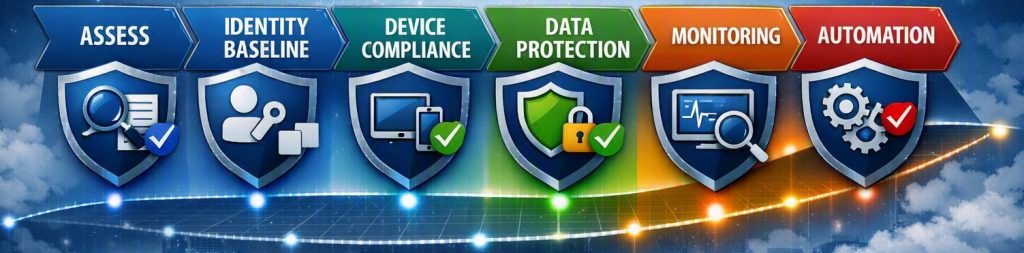
If the implementation stalls, the issue is often not the technology but the operating model. The adoption framework notes that moving from a traditional security model to Zero Trust requires buy-in and change management across the organization.
Conclusion
A practical Zero Trust architecture for Microsoft 365 relies on repeated security decisions: verify every request, reduce standing privilege, assume breach, classify and protect data, and continuously observe the environment. First, well designed and planned implementations progress in phases. Second, any corrective activities are based on measuring outcomes of those phases. Third, assign joint ownership across identity, endpoint, data, collaboration, and security teams (RACI matrix).



Be the first to comment